

How to Choose the Right AI Tool for Your Needs? With over 10,000 artificial intelligence applications on the market, software fatigue has become a major productivity bottleneck. The cycle is familiar: teams buy over-hyped subscriptions, spend dozens of hours trying to configure them, and ultimately abandon them when outputs fall short of expectations.
Selecting enterprise or productivity software shouldn’t feel like gambling. Whether you are a solopreneur optimizing daily throughput, a team lead streamlining cross-functional workflows, or an enterprise IT manager safeguarding sensitive client data, you need an objective decision framework to cut through marketing noise.
What is the best framework to choose an AI tool?
To choose the right AI tool, evaluate candidates across five core steps:
1) Categorize the software tier,
2) Define your exact operational bottlenecks,
3) Audit hidden token and credit pricing costs,
4) Enforce strict zero-data-retention (ZDR) privacy standards, and
5) Run real-world edge-case trials using a weighted evaluation scorecard.
The 5 Categories of AI Tools
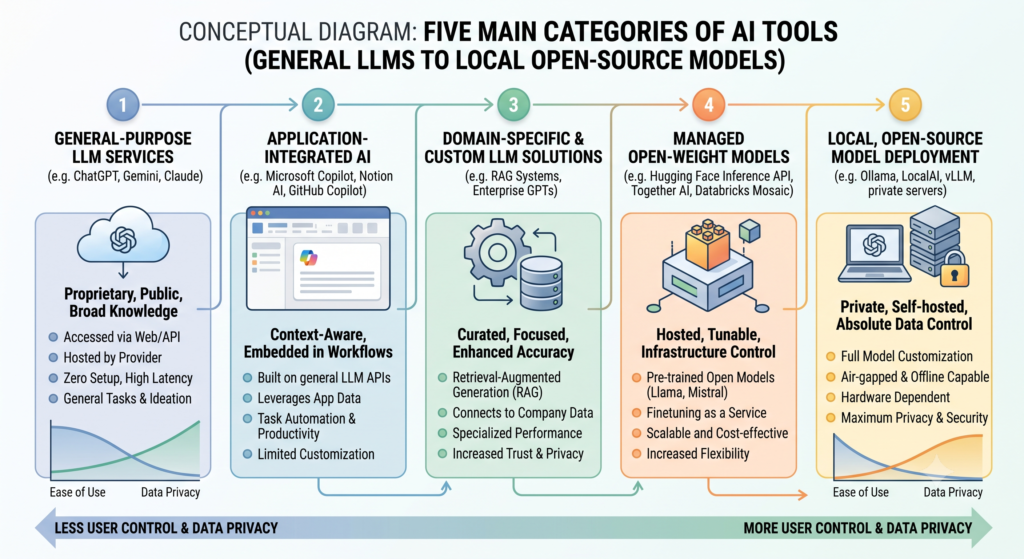
Evaluating AI software requires comparing like for like. Measuring a broad conversational assistant like ChatGPT directly against a specialized video generation engine like Runway leads to flawed purchasing decisions.
                  ┌─────────────────────────────────────────┐
                  │          The AI Software Spectrum       │
                  └────────────────────┬────────────────────┘
                                       │
     ┌──────────────────┬──────────────┼──────────────┬──────────────────┐
     ▼                  ▼              ▼              ▼                  ▼
┌──────────┐      ┌───────────┐  ┌───────────┐  ┌───────────┐      ┌───────────┐
│ General  │      │ Niche     │  │ Workflow  │  │ Embedded  │      │ Open-     │
│ LLMs     │      │ Vertical  │  │ & Agents  │  │ Apps      │      │ Source    │
└──────────┘      └───────────┘  └───────────┘  └───────────┘      └───────────┘
1. Foundational LLMs & Web Assistants
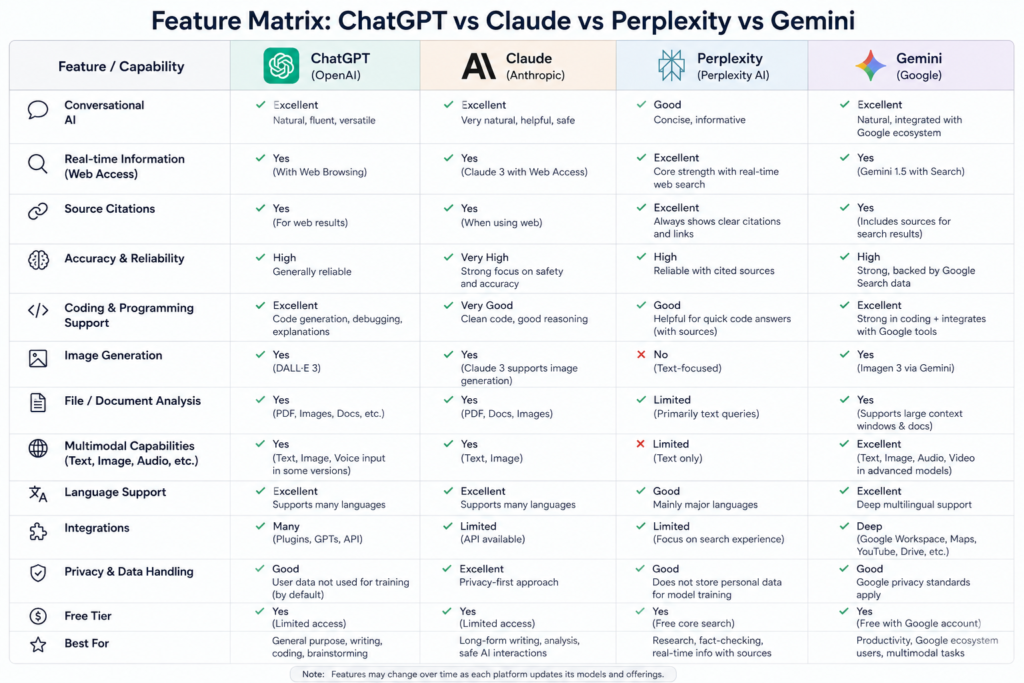
- Primary Examples: OpenAI ChatGPT, Anthropic Claude, Google Gemini.
- Best For: Open-ended research, brainstorming, code generation, and direct text reasoning.
- Practical Nuance: Highly versatile and cost-effective entry points, but they lack the customized user interface (UI) controls needed for specialized, repeatable industry production.
2. Specialized Vertical SaaS
- Primary Examples: Jasper (SEO content), Midjourney (Image generation), Descript (Audio/Video editing).
- Best For: Industry-specific workflows that demand fine-tuned output control.
- Practical Nuance: Built on customized front-ends with custom prompt chains. They offer rapid onboarding for non-technical users but come with higher monthly per-seat costs.
3. Workflow & Agentic Automation
- Primary Examples: Zapier Central, Make.com, CrewAI, Auto-GPT.
- Best For: Connecting fragmented software stacks and executing autonomous multi-step triggers.
- Practical Nuance: Operates in the background via APIs to move data across platforms (e.g., reading an incoming lead email, updating your CRM, and drafting a custom proposal).
4. Embedded AI Capabilities
- Primary Examples: Notion AI, HubSpot Content Assistant, Salesforce Einstein.
- Best For: Organizations seeking friction-free adoption within software they already pay for.
- Practical Nuance: Eliminates new software onboarding, but feature depth often lags behind dedicated standalone applications.
5. Open-Source & Local Models
- Primary Examples: Ollama, LM Studio, Hugging Face architecture (e.g., Llama 3, Mistral).
- Best For: Developers, healthcare/legal compliance, and offline deployment.
- Practical Nuance: Eliminates monthly SaaS fees and provides 100% data sovereignty, but requires substantial local hardware (typically dedicated GPUs with 16GB+ VRAM).
| AI Category | Primary Strengths | Major Limitations | Ideal User Profile |
| Foundational LLMs | Highly flexible, top-tier reasoning capabilities | Lacks structured production UIs | Solopreneurs, Analysts, Researchers |
| Specialized SaaS | Plug-and-play workflows for niche industries | Vendor lock-in, premium per-seat pricing | Content Teams, Designers, Marketers |
| Workflow Automation | Eliminates manual data transfer across apps | Requires initial logic mapping & API upkeep | Operations Managers, Growth Leads |
| Embedded AI | Zero onboarding curve, native data access | Basic features compared to niche tools | Enterprise Employees, Sales Ops |
| Open-Source / Local | Complete data privacy, zero recurring fees | Requires high-end hardware & tech skills | Developers, Legal & Healthcare Teams |
Step 1: Define Your Operational Requirements
How to Choose the Right AI Tool for Your Needs: A 2026 Evaluation Framework A major mistake in software procurement is starting with the question: “What can this AI tool do?” This leads to buying solutions for non-existent problems. Instead, frame your search around business friction: “Which high-frequency task is consuming expensive team hours?”
Mapping High-ROI Use Cases
Target tasks that are predictable, frequent, and time-intensive. Audit your team’s weekly workflow across three operational tiers:
- Tier 1: Augmentation (Human-in-the-Loop): Accelerating manual human tasks. Example: Generating an initial response draft for customer inquiry tickets.
- Tier 2: Automation (Rule-Based Execution): Replacing manual data entry entirely. Example: Extracting structured line items from PDF invoices into an accounting database.
- Tier 3: Transformation (Agentic Workflows): Redesigning multi-stage operations. Example: Automatically monitoring brand mentions, evaluating sentiment, and routing high-priority cases to account executives.
Tip: If a process requires deep emotional intelligence, high-stakes negotiation, or physical physical presence, do not automate it. Focus your initial rollouts on tasks with high input data volume and clear success metrics.
Step 2: Compare AI Costs & Decode Pricing Structures
Traditional SaaS software bills a predictable monthly rate per user seat. AI software pricing is far more volatile because vendors must cover high backend infrastructure and compute costs.
       TRADITIONAL SAAS PRICING                    AI SOFTWARE PRICING
 ┌──────────────────────────────────┐       ┌──────────────────────────────────┐
 │ • Fixed Per-Seat Monthly Fee     │   vs. │ • Flat Tier + Overage Credits    │
 │ • Unlimited Feature Usage        │       │ • Context Window Token Inflators │
 │ • Predictable Annual Budget      │       │ • Per-Seat Upgrade Thresholds    │
 └──────────────────────────────────┘       └──────────────────────────────────┘
Understanding Credit Expiration & Token Inflation
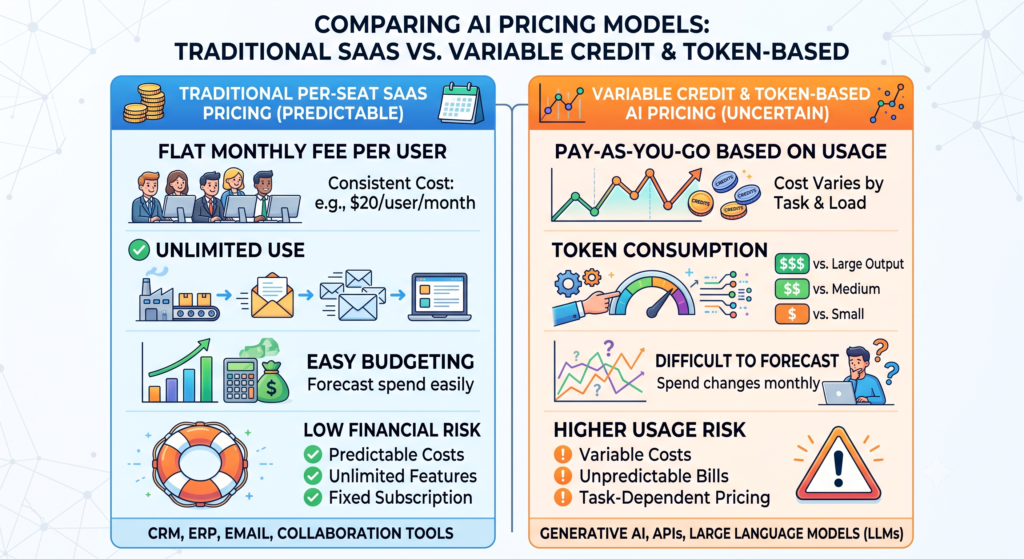
- The Monthly Credit Trap: Many platforms issue a fixed number of monthly credits (e.g., 2,000 credits/month). Crucially, unused credits rarely roll over. If your usage fluctuates seasonally, you risk paying for unused compute capacity during slow months.
- Context Window Inflation: Processing long documents consumes tokens exponentially. A 100-page PDF uploaded to a chatbot consumes significantly more backend resource tokens per query than a short paragraph request.
- Seat Minimum Thresholds: Vendors frequently limit enterprise privacy features or native API connectors to higher plan tiers that carry 5-to-10 seat minimums, turning a $30/month tool into a $300/month commitment.
| Pricing Model | Operational Mechanics | Hidden Risks & Constraints | Best Suited For |
| Flat Monthly Subscription | Fixed recurring fee ($20–$50/mo) | Performance throttling during peak global demand | Individual users & light usage |
| Credit / Token System | Metered billing per query or output | Credits expire at month-end; hard to forecast costs | Variable, project-based workloads |
| Pay-As-You-Go (API) | Billed per 1,000 input/output tokens | Rapid cost spikes from recursive prompts or loops | Developers & technical teams |
| Per-Seat Enterprise | Billed per active user seat annually | Mandatory seat minimums & annual commitments | Mid-to-large business teams |
Step 3: Assess Data Privacy, Security & Training Risks
When you upload proprietary source code, financial projections, or customer records into an AI application, where does that data live? Free and low-cost consumer AI tools frequently use prompt data to train future public base models.
Navigating Vendor Data Policies
Before submitting sensitive information to any vendor, review their security terms for these three data handling standards:
- 🔴 Public Training (High Risk): Your inputs, files, and generated outputs are stored, analyzed, and integrated into base training datasets. (Common in free consumer tiers).
- 🟡 Standard Commercial Retention (Medium Risk): Your data is not used for base model training, but is retained on vendor servers for 30 days for manual abuse monitoring. (Common in standard paid SaaS plans).
- 🟢 Zero Data Retention / ZDR (Zero Risk): Inputs are processed strictly in volatile memory (RAM) and immediately erased. No prompts, outputs, or meta-logs are written to disk. (Standard in SOC2 Type II compliance tiers and developer APIs).
Security Checklist: For corporate deployments, ensure the vendor provides SOC2 Type II certification, GDPR/CCPA compliance options, and an explicit Zero Data Retention (ZDR) addendum. (See our complete guide on [Internal Link: Enterprise AI Data Security Checklist]).
Step 4: Evaluate Integration Capabilities & Model Portability
Avoid software silos. An AI tool that does not fit into your primary communication software or database will quickly turn into shelfware.
Webhook & API Ecosystems
Prioritize applications that feature native integrations with your core business stack (e.g., Slack, Microsoft Teams, Google Workspace, HubSpot). If native integrations are unavailable, verify that the application offers open REST APIs or native webhooks for middleware platforms like Zapier or Make.com.
Avoiding Vendor Lock-In
The fast pace of artificial intelligence development means today’s leading model could be outperformed in six months. Protect your workflow investment by choosing tools that support clean data portability:
- System Prompt Exportability: Ability to export custom instructions and prompt templates.
- Knowledge Base Portability: Easy export of uploaded vector embeddings and custom RAG (Retrieval-Augmented Generation) document databases.
- Standard File Formatting: One-click data exports in standard JSON, CSV, or Markdown formats.
Step 5: Test via the “3-Stage Trial Strategy”
Marketing demos are designed to showcase idealized outputs under perfect conditions. Evaluate candidate software using real-world tasks and edge cases.
1.Run Edge-Case Benchmark Tests:Skip idealized marketing prompts.
Feed the candidate tool messy, real-world assets (e.g., non-standard formatted spreadsheets, ambiguous customer briefs) to see how gracefully it handles unstructured inputs.
2.Audit Hallucination & Error Rates:Verify facts, citations, and logic.
Run a standardized batch of 10 complex queries. Quantify how many outputs contain fabricated data, incorrect citations, or formatting errors that require human intervention.
3.Conduct Non-Technical User Testing:Assess real-world ease of use.
Assign the tool to a non-technical team member without giving them a tutorial. If they cannot complete a core task independently within 15 minutes, the interface friction is too high for team adoption.
The Weighted AI Tool Evaluation Scorecard
To remove bias from your purchasing decisions, use a weighted scoring model. This prevents fancy features from overshadowing essential requirements like security, integration, and cost efficiency.
Practical Scoring Template
Score competing tools on a scale of 1 to 10 for each criterion, multiply by the weighted factor, and sum the results:
| Evaluation Criteria | Weight | Weighted Score |
| Cost Efficiency & Transparency | 30% | = 2.40 |
| Data Security & Privacy Safeguards | 25% | = 2.25 |
| Ease of Use & Workflow Fit | 25% | = 1.75 |
| Integrations & Export Portability | 20% | = 1.20 |
| TOTAL EVALUATION SCORE | 100% | 7.60 / 10 |
4 Signs You’re Looking at an “AI Wrapper” Scam
What is an AI Wrapper?
An AI Wrapper is a lightweight software application that places a basic user interface over a third-party API (such as OpenAI or Anthropic) without adding proprietary algorithms, workflow automation, or fine-tuned model logic.
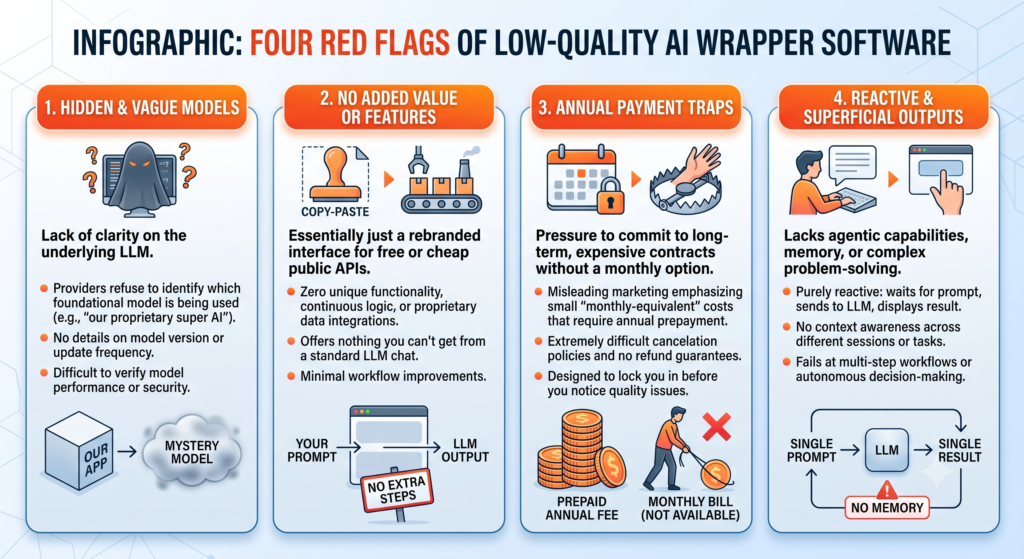
While not all wrappers are inherently bad, low-quality wrappers charge steep markup fees for basic API access. Watch out for these four warning signs:
HOW TO SPOT AN “AI WRAPPER” SCAM
Zero Model Transparency (Hides which API powers the app)
Aggressive Annual-Only Plans (No monthly trial option)
Proprietary Data Lock-In (Cannot export prompts/history)
No System Uptime Dashboard (Hides API service outages)
- Zero Model Transparency: The vendor hides which underlying foundation model powers their software.
- Aggressive Annual-Only Billing: No free trial, no monthly payment tier, and strict non-refundable terms buried in fine print.
- Proprietary Data Lock-In: No feature to export your saved prompts, conversation histories, or trained parameters.
- No System Uptime Page: The company lacks a public status dashboard to track API latency, service outages, or scheduled maintenance.
Frequently Asked Questions (FAQs)
What is an AI Wrapper and should I avoid them?
An AI wrapper is a software app built on top of a third-party model API. You don’t need to avoid all wrappers—many add legitimate value through excellent user interfaces, specialized industry features, or native app integrations. However, you should avoid generic wrappers that simply mark up raw API access without offering proprietary features or workflow improvements.
Is free AI software safe for confidential business data?
No. Free consumer AI tiers routinely offset operational compute costs by using uploaded prompt data, attachments, and generated outputs to train future public base models. For business, legal, or financial operations, always use paid tiers that include Zero Data Retention (ZDR) agreements, or deploy local, open-source models offline.
How do I calculate the projected ROI of an AI tool before buying?
How to Calculate AI Tool ROI
To calculate pre-purchase return on investment, use the following formula:
$$\text{Monthly Net ROI} = (\text{Hours Saved per Week} \times \text{Hourly Labor Rate} \times 4) – \text{Monthly Software Cost}$$
If the estimated net savings is not at least 3x to 5x the cost of the software subscription, the tool may not justify the added operational complexity.
Should I buy specialized AI tools or stick to general LLMs like ChatGPT?
Start with general foundational LLMs (like ChatGPT or Claude). They are budget-friendly and handle a broad variety of research, writing, and coding tasks well. Upgrade to specialized vertical SaaS tools only when you hit clear friction points—such as needing specialized file exports, advanced design controls, or automated multi-app triggers.
How can I protect my organization if an AI vendor shuts down?
Prevent vendor lock-in by maintaining an offline repository of system prompts, standard operating procedures (SOPs), and raw data exports. Choose tools built on standard API architectures so you can easily swap backend model providers (e.g., migrating from OpenAI to Anthropic or open source) with minimal workflow disruption.
Read about AI Bots & Your Ad Revenue: What You Need to Know
With over 10,000 artificial intelligence applications on the market,
Cloud Computing in AI 2026: 7 Trends to Watch online – nowstrends.com
What is the best AI tool for students in 2026? – nowstrends.com
India’s IT sector is surviving artificial intelligence
Hostinger vs AWS (2026): Which Hosting Is ACTUALLY Better for Beginners? – nowstrends.com
[…] How to Choose the Right AI Tool for Your Needs? […]
[…] How to Choose the Right AI Tool for Your Needs? […]