

Hostinger vs AWS (2026): Which Hosting Is ACTUALLY Better for Beginners?
Hostinger is significantly better for non-technical beginners, bloggers, and small business owners who need a fully managed website operating within minutes. It includes an intuitive control panel (hPanel), 24/7 human live chat support, free SSL certificates, and automated backups out of the box. AWS is better for computer science students, developers, and tech enthusiasts who want root server control, microservices architecture, or custom cloud deployments—and are comfortable managing security patches and server configurations via command-line SSH.
1. The Core Difference: Are You Comparing Apples to Oranges?
Comparing Hostinger directly to AWS often leads to confusion. It is like comparing a fully serviced office space lease to leasing raw industrial land where you must bring your own architecture, security guards, and electrical wiring. Both put your business online, but they operate under completely different management models.
+-----------------------------------------------------------------------+
|                         HOSTINGER EXPERIENCE                          |
|  +-----------------------------------------------------------------+  |
|  | hPanel (Visual GUI)                                             |  |
|  | +-----------------+ +------------------+ +--------------------+ |  |
|  | | One-Click WP    | | Free Auto-SSL    | | Free Email Mailbox | |  |
|  | +-----------------+ +------------------+ +--------------------+ |  |
|  +-----------------------------------------------------------------+  |
|  | Managed Infrastructure: OS Updates, Backups, Firewalls Handled  |  |
+-----------------------------------------------------------------------+

+-----------------------------------------------------------------------+
|                            AWS EXPERIENCE                             |
|  +-----------------------------------------------------------------+  |
|  | AWS Console / SSH Command Line (Terminal)                        |  |
|  | +-----------------+ +------------------+ +--------------------+ |  |
|  | | Manual LAMP/LEMP| | Certbot / SSL    | | Amazon WorkMail    | |  |
|  | | Stack Config    | | Management       | | or SES SMTP Config | |  |
|  | +-----------------+ +------------------+ +--------------------+ |  |
|  +-----------------------------------------------------------------+  |
|  | Unmanaged Infrastructure: You Manage OS Security, Patches & Cost|  |
+-----------------------------------------------------------------------+
Managed Web Hosting vs. Unmanaged Cloud Compute
- Hostinger is a fully managed web host. When you sign up, Hostinger maintains the underlying physical hardware, updates the operating system (OS), applies PHP patches, tunes web server performance (LiteSpeed), and runs daily file backups behind the scenes.
- AWS (Amazon Web Services) is an Infrastructure-as-a-Service (IaaS) platform. When you spin up an Amazon EC2 (Elastic Compute Cloud) instance, you receive a blank virtual machine. You are the system administrator—responsible for installing web server software (Apache/Nginx), setting up databases (MySQL/PostgreSQL), and securing open network ports.
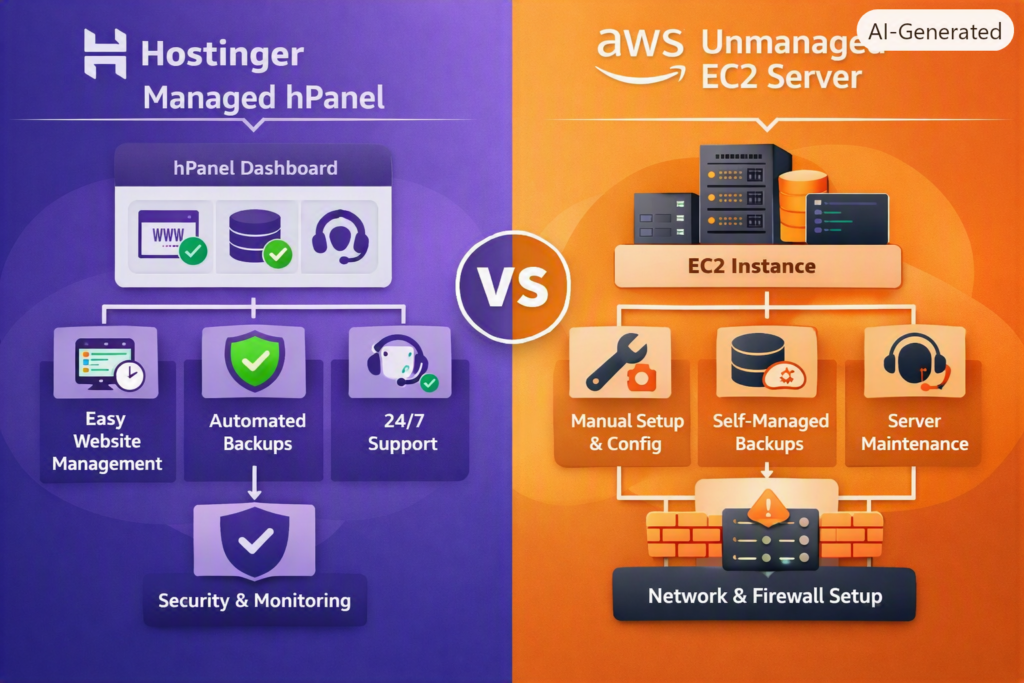
Hostinger vs. Amazon Lightsail
Comparing Hostinger’s shared web hosting to raw AWS EC2 is an unfair match. A far more realistic comparison is Hostinger vs. Amazon Lightsail.
Amazon Lightsail is AWS’s simplified Virtual Private Server (VPS) service. It bundles compute power, RAM, and SSD storage into predictable monthly pricing tiers to directly compete with traditional web hosts. However, while Lightsail simplifies cloud provisioning, it remains largely unmanaged—you still handle server-level software maintenance and SSH configuration.
2. Head-to-Head Comparison Matrix
| Feature Category | Hostinger (Business Plan) | Amazon Lightsail (2GB VPS) | AWS EC2 (t3.micro Cloud) |
| Primary Target Audience | Complete Beginners, SMBs, Creators | Junior Developers, Tech Enthusiasts | DevOps Engineers, Enterprises |
| Control Panel | Custom hPanel (Visual GUI) | Lightsail Dashboard (Simplified) | AWS Console (Complex) |
| Server Administration | 100% Fully Managed | Self-Managed / Unmanaged | Self-Managed / Unmanaged |
| Free SSL Certificate | Automated 1-Click Installation | Manual (Certbot Script via SSH) | Manual (AWS Certificate Manager/CLI) |
| Domain Email Accounts | Included Free (Webmail) | Paid Add-on (Amazon WorkMail/SES) | Paid Add-on (Amazon WorkMail/SES) |
| 24/7 Human Tech Support | Included via Live Chat | Paid Tier ($29+/mo minimum) | Paid Tier ($29+/mo minimum) |
| Pricing Model | Fixed Tier Subscription | Fixed Monthly Cap / Hourly | Granular Pay-As-You-Go |
| Technical Skill Required | None (0/10) | Intermediate (5/10) | Advanced (9/10) |
3. Ease of Use & Dashboard Experience
Hostinger’s hPanel: Built for Non-Techies
Hostinger skips traditional, bloated cPanels in favor of hPanel—a streamlined, multi-language dashboard designed around usability.
Installing WordPress, checking monthly resource consumption, provisioning free SSL certificates, or restoring database snapshots takes just a couple of clicks. Non-technical site owners never need to touch a command-line interface.
[hPanel Dashboard] ──► [1-Click WordPress] ──► [Auto-SSL & LiteSpeed Cache] ──► Site Live!
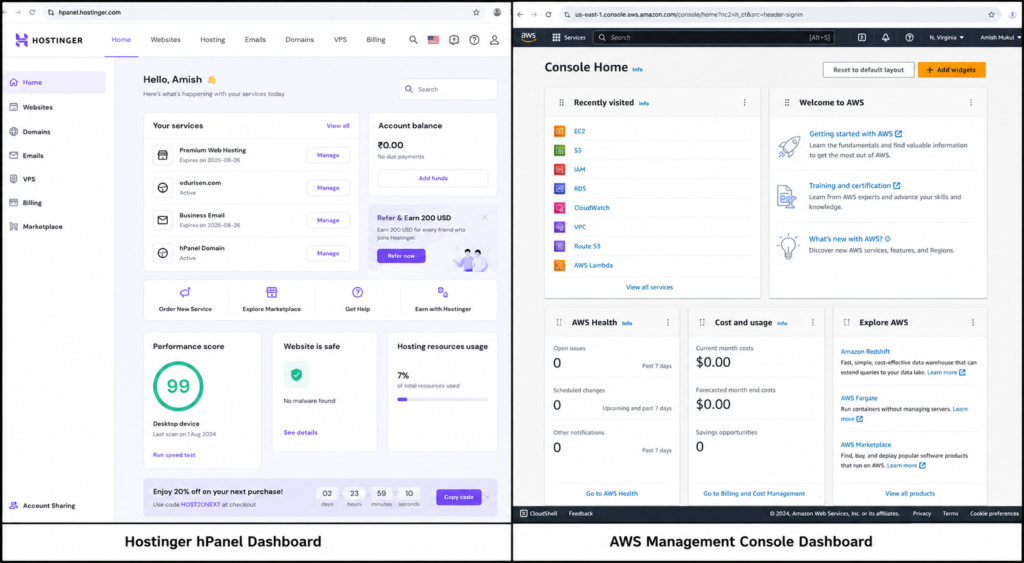
AWS Management Console: Overwhelming for Beginners
Logging into the primary AWS Console displays over 200 enterprise cloud services.
For a beginner, the learning curve is steep. Tasks like creating an EC2 instance, setting up an Identity and Access Management (IAM) role, attaching an Elastic IP, and configuring Security Groups (cloud firewalls) require an understanding of networking fundamentals.
Amazon Lightsail: Simplified, but Still Developer-First
Lightsail strips away enterprise cloud complexity with a cleaner dashboard. You can launch pre-configured software stacks (e.g., WordPress or LAMP) in seconds.
However, once your server instance is active, routine site maintenance—like pulling server access logs, updating PHP memory limits, or locating database credentials—often requires logging in via SSH terminal commands.
4. Pricing Breakdown & The “Hidden Cost” Trap
Hostinger Pricing: Predictable Subscriptions
Hostinger offers heavy introductory discounts (e.g., $2.99/mo for the Business plan when locking in a long-term contract).
When your initial term ends, the plan renews at a standard flat rate (typically $10.99–$16.99/mo depending on plan and billing cycle). Even with renewal price increases, Hostinger’s pricing remains predictable. Your hosting, NVMe SSD storage, SSL certificates, weekly/daily backups, and domain email are bundled into a single invoice.
AWS Pricing: The “Free Tier” Fallacy & Billing Surprises
AWS advertises a 12-Month Free Tier (including 750 monthly hours of micro instances). However, hosting a real-world production site on AWS frequently triggers hidden line-item costs that catch beginners off guard:
- Unattached Elastic IP Retention Fees: AWS charges an hourly rate for static public IPv4 addresses that are reserved on your account but disconnected from an active, running instance.
- Stopping an Instance Doesn’t Pause Billing: Stopping an EC2 or Lightsail server pauses compute charges, but you continue to pay for the attached Elastic Block Store (EBS) disk storage until the volume is deleted.
- Bandwidth Out (Data Egress): While data coming into AWS is free, outbound bandwidth exceeding plan allowances incurs per-gigabyte costs.
- Email Routing Costs: Sending transactional emails (like WordPress password resets) requires setting up Amazon SES or paying $4.00/user/month for Amazon WorkMail.
1-Year Total Cost of Ownership (TCO) Comparison
| Cost Component | Hostinger Business Plan (Year 1) | AWS Lightsail Setup (1 Year) |
| Base Hosting Compute & SSD | ~$35.88 ($2.99/mo promo) | $120.00 ($10.00/mo 2GB Instance) |
| Domain Registration (.com) | $0.00 (Included 1st Year) | ~$13.00 – $15.00/year (Route 53) |
| Domain Email Hosting | $0.00 (Included Mailbox) | ~$48.00/year ($4/user/mo WorkMail) |
| Human Technical Support | Included 24/7 | $0.00 (Community) or $348.00/yr (Dev Plan) |
| Backups & Snapshots | $0.00 (Daily Auto Backups) | ~$12.00 – $24.00/year ($0.05/GB-mo) |
| Est. Real Year 1 Out-of-Pocket | ~$35.88 – $48.00 | ~$193.00 – $220.00+ |
5. WordPress Setup & Time-to-Publish Workflow
To illustrate the practical difference in user experience, here is what it takes to launch a WordPress site on both platforms.
Scenario A: Launching on Hostinger (~3 Minutes)
- Complete the setup wizard inside hPanel.
- Select WordPress, enter your desired admin credentials, and click Install.
- Hostinger handles database provisioning, generates a free SSL certificate, enables LiteSpeed caching, and points your domain name automatically.
- Your site is live and secure.
Scenario B: Launching on AWS Lightsail (~35–50 Minutes)
- Log into the AWS Lightsail Console and provision a Bitnami WordPress instance.
- Generate and download a public/private SSH key pair (
.pemfile) to your computer. - Allocate a static IPv4 address and attach it to your running instance.
- Open your local SSH terminal:Bash
ssh -i ~/Keys/lightsail-key.pem bitnami@192.0.2.45 - Extract the auto-generated Bitnami application password from the server log files using command-line prompts.
- Manually edit DNS records at your domain registrar to point to the static IP address.
- Run Bitnami’s Let’s Encrypt auto-configuration script via terminal to issue an SSL certificate:Bash
sudo /opt/bitnami/bncert-tool
6. Security, Maintenance & Nightly Operations
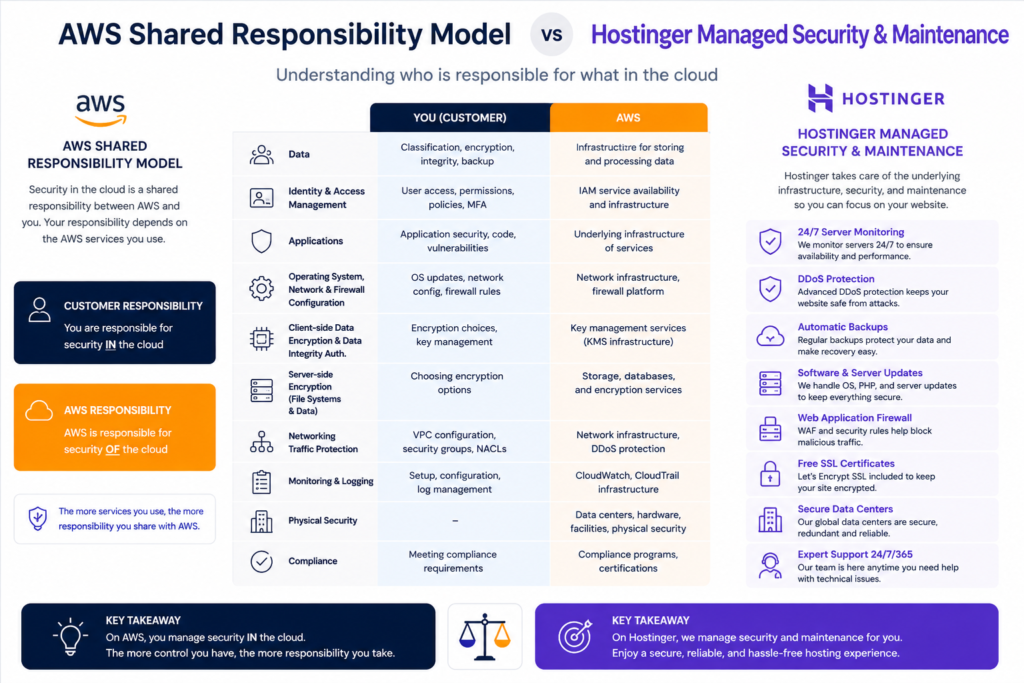
Understanding the Shared Responsibility Model
       HOSTINGER SECURITY                     AWS SECURITY MODEL
+------------------------------+     +------------------------------+
| Hostinger Handles Everything |     | AWS Handles Hardware Only    |
| - Server OS & Kernel Updates |     | - Physical Data Center       |
| - Security Patches           |     | - Hypervisor Virtualization  |
| - Web Server (LiteSpeed)     |     +------------------------------+
| - Firewall & DDoS Defense    |     | YOU Handle Server OS & Upkeep|
| - Automated Backups          |     | - OS Security Updates        |
+------------------------------+     | - Firewall Ports (Sec Groups)|
                                     | - Web Server & PHP Patches   |
                                     | - SSL Certificates & Backups |
                                     +------------------------------+
- On Hostinger: Server security is managed for you. Hostinger continuously applies operating system security updates, patches PHP runtimes, mitigates DDoS attacks, runs malware scans, and performs automated daily backups.
- On AWS: Security operates under a Shared Responsibility Model. AWS secures the physical infrastructure, hypervisor, and data center facilities. You are responsible for securing everything running inside the server. If a Linux kernel exploit requires patching, you must log in over SSH and run OS updates manually.
📌 Learn More: Read our detailed guide on [WordPress Security Best Practices] to protect your site against common exploits.
7. Customer Support & Emergency Assistance
Hostinger Support: 24/7 Human Assistance
Hostinger provides round-the-clock live chat support inside hPanel. If your site throws a 500 Internal Server Error, an SSL certificate fails to renew, or a database connection drops, Hostinger support agents can access server logs and directly assist in resolving the issue.
AWS Support: Self-Service & Paid Tiers
Free AWS support covers account and billing inquiries only.
If your website crashes, your database becomes corrupted, or an SSL script breaks on Lightsail or EC2, AWS support will not fix your application code or server configuration unless you subscribe to a Developer Support Plan (starting at $29/month). Non-paying users must rely on technical documentation, developer community forums, or self-guided debugging.
8. Performance, TTFB & Network Reliability
Real-World Speed Comparison
In objective global testing, AWS infrastructure achieves exceptional global response times (~0.275s worldwide average) due to its vast network backbone.
However, for a typical website or WordPress blog, Hostinger often delivers faster out-of-the-box loading speeds. This is because Hostinger plans run on LiteSpeed Web Servers with built-in server-level object caching.
To match Hostinger’s out-of-the-box performance on AWS, you must manually install and configure caching layers (like Redis or Varnish) and set up Amazon CloudFront CDN distributions.
📌 Related Reading: Check out our in-depth [Hostinger Performance Review & Benchmark Tests] to see how its NVMe storage scales under heavy traffic.
9. Two Real-World Persona Scenarios
Scenario 1: Sarah, Freelance Graphic Designer
- Goal: Build a portfolio site and launch 3 client WordPress websites.
- Skill Level: Non-technical; proficient with design tools, but no command-line experience.
- Best Choice: Hostinger.Sarah can deploy all 4 sites under a single Hostinger Business plan. She receives free domain email mailboxes, automated daily backups, and visual staging environments without managing Linux packages or DNS infrastructure.
Scenario 2: Alex, Computer Science Student & App Developer
- Goal: Launch a custom Node.js web app connected to a PostgreSQL database, with plans to build a REST API.
- Skill Level: Comfortable with Git, Linux terminal, and SSH commands.
- Best Choice: AWS (Lightsail or EC2).Alex needs root access to install custom application runtimes, configure reverse proxies (Nginx), and build scalable cloud microservices. AWS gives him complete server freedom.
10. Final Verdict & Decision Framework
Choose Hostinger If:
- You are a blogger, small business owner, creator, or freelancer.
- You want a website online in under 10 minutes without touching a line of code.
- You need 24/7 human live chat support to help fix technical glitches.
- You want transparent, predictable hosting invoices with domain email and backups included.
- Visit Hostinger – Bring Your Idea Online With a Website
Choose AWS If:
- You are a developer, computer science student, or aspiring DevOps engineer.
- You are building custom software applications (Node.js, Python, Docker containers, Go).
- You require full root access, API integrations, or specialized microservices architecture.
- Visit Free Cloud Computing Services – AWS Free Tier
11. Frequently Asked Questions (FAQs)
Is AWS really free for the first year?
AWS offers a Free Tier with 750 monthly hours of micro instances for 12 months. However, hosting a live production site often incurs minor charges for domain registration, static IP retention, snapshot storage, or outbound bandwidth usage.
Can I host WordPress on AWS without coding skills?
While Amazon Lightsail offers 1-click WordPress templates, long-term server management—such as applying operating system security patches, setting up SSL certificates via Certbot, or adjusting file permissions—requires comfort using terminal commands via SSH.
Which hosting platform is better for e-commerce stores?
For non-technical store owners using WooCommerce, Hostinger is easier to manage because it includes pre-configured server caching, automatic updates, and 24/7 live support. For custom-built enterprise e-commerce platforms requiring complex multi-database scaling, AWS provides greater infrastructure flexibility.
Is Amazon Lightsail the same thing as AWS EC2?
No. Amazon Lightsail is a simplified VPS service with bundled resources and fixed monthly pricing tiers. AWS EC2 is an enterprise cloud compute service offering pay-as-you-go hourly billing and granular architecture control.
What happens if my website traffic suddenly spikes?
On Hostinger Shared plans, sudden traffic spikes may lead to resource throttling if you exceed account CPU/RAM allocations, requiring a plan upgrade. On AWS EC2, you can configure Auto Scaling groups to launch additional virtual instances automatically to absorb traffic, though your monthly usage bill will scale up accordingly.
Read about Cloud Computing in AI 2026: 7 Trends to Watch online – nowstrends.com
What is the best AI tool for students in 2026? – nowstrends.com
Supabase vs MongoDB Atlas: Best Cloud Database 2026 – nowstrends.com
How To Differentiate between AI Agents vs. Chatbots? – nowstrends.com
Google Gemini vs ChatGPT (2026): Which AI Assistant Is Actually Better? – nowstrends.com
[…] Read about Hostinger vs AWS (2026): Which Hosting Is ACTUALLY Better for Beginners? – nowstrends.com […]
[…] Read about Hostinger vs AWS (2026): Which Hosting Is ACTUALLY Better for Beginners? – nowstrends.com […]
[…] Read about Hostinger vs AWS (2026): Which Hosting Is ACTUALLY Better for Beginners? – nowstrends.com […]
[…] Hostinger vs AWS (2026): Which Hosting Is ACTUALLY Better for Beginners? – nowstrends.com […]
[…] Read about Hostinger vs AWS (2026): Which Hosting Is ACTUALLY Better for Beginners? – nowstrends.com […]
[…] Hostinger vs AWS (2026): Which Hosting Is ACTUALLY Better for Beginners? – nowstrends.com […]
[…] Hostinger vs AWS (2026): Which Hosting Is ACTUALLY Better for Beginners? – nowstrends.com […]