

The Best Project Management Software: 2026 Choosing project management software used to be simple: you picked a platform that assigned tasks and displayed a clean Gantt chart. Today, the market is flooded with tools promising built-in AI agents, workflow automations, custom relational databases, and real-time collaborative workspaces.
Most software reviews simply regurgitate marketing landing pages. They list basic specifications without testing how these systems behave under heavy, 50+ user workloads, conceal true subscription costs behind restrictive feature tiers, and ignore steep onboarding friction.
Over six months of hands-on testing, our research team built real-world workflows—including a 200-task cross-functional product launch and a multi-branch agency client pipeline—across the industry’s leading work platforms. This guide provides an honest evaluation of their capabilities, total cost of ownership (TCO), failure points, and optimal use cases.
What is the best project management software?
Quick Answer: monday.com is the best project management software for general cross-team collaboration due to its visual usability. ClickUp offers the best value for feature-dense customization, Asana excels at enterprise task structure, Jira leads for agile software development, Smartsheet best suits spreadsheet-heavy operations, and Notion is ideal for documentation-first teams.
PricePulse — Competitor Pricing Intelligence for SaaS Founders
| Software | Best For | Primary Framework | Real Cost (10 Users/Mo)* | Time-to-Value | Top Disqualifier |
|---|---|---|---|---|---|
| monday.com | Visual Workflows & Operations | Hybrid / Kanban | ~$120 – $190 | Fast (< 3 days) | Multi-board dependency tracking breaks down |
| ClickUp | All-in-One Value & Customization | Agile / Hybrid | ~$100 – $190 | Moderate (1–2 weeks) | UI clutter and database latency on large projects |
| Asana | Enterprise Cross-Team Coordination | Structured Hybrid | ~$135 – $295 | Fast (< 1 week) | Critical features locked behind steep $24.99+ tiers |
| Jira | Software Engineering Sprints | Pure Scrum / Agile | ~$81 – $160 | Slow (2–4 weeks) | Overwhelming administrative UI for business teams |
| Smartsheet | Operations & Grid-Based Auditing | Waterfall / Grid | ~$90 – $190 | Moderate (1 week) | Outdated chat; rigid mobile experience |
| Notion | Modular Docs & Knowledge Bases | Custom / Wiki | ~$100 – $150 | Moderate (1 week) | Lack of hard, automated timeline dependencies |
*Note: Estimated real-world costs reflect the tier required to unlock operational essentials like automated workflows, timeline views, guest permissions, and time tracking.
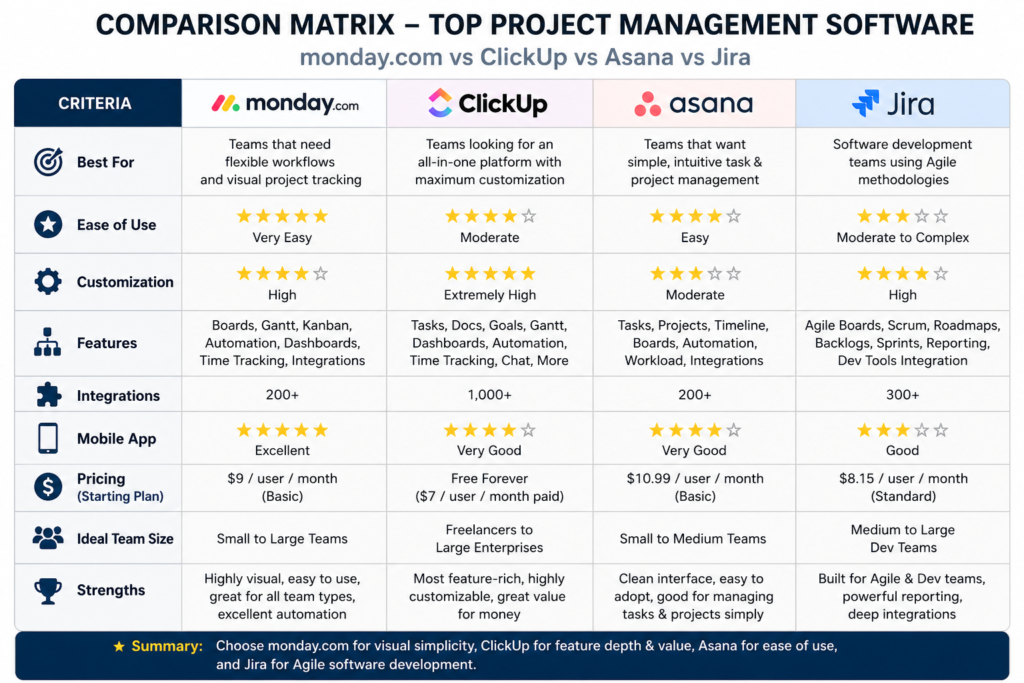
How We Evaluated These Project Management Tools
To evaluate these platforms beyond surface-level feature lists, we subjected each tool to four core operational benchmarks:
1. Real-World Total Cost of Ownership (TCO) vs. Base Rates
An advertised rate of “$9/user/month” often balloons when you realize that critical operational features—such as timeline views, custom reporting, or external guest access—require mandatory upgrades to $20+ Enterprise tiers. We calculated true per-user costs based on what operational teams actually pay.
PricePulse — Competitor Pricing Intelligence for SaaS Founders
2. Time-to-Value & Onboarding Friction
Software is useless if your team refuses to use it. We measured the hours required for a non-technical team to set up workspaces, build custom project pipelines, and run daily standups without paying for specialized administrative consultants.
3. Stress-Testing Advanced Workflows
We stress-tested platforms beyond simple to-do lists by building realistic, complex environments: 50-task finish-to-start dependencies, cross-project portfolio rollups, automated trigger chains, and workload capacity management across shared personnel.
4. AI Utility: Practical Tools vs. Marketing Gimmicks
We evaluated native AI implementations to separate genuine productivity boosters—such as auto-generating subtasks from a design brief or summarizing comment chains—from superficial chat widgets that clutter the user interface.
The Top Project Management Tools Reviewed & Tested
1. monday.com — Best for Visual Workflows & Custom Automation
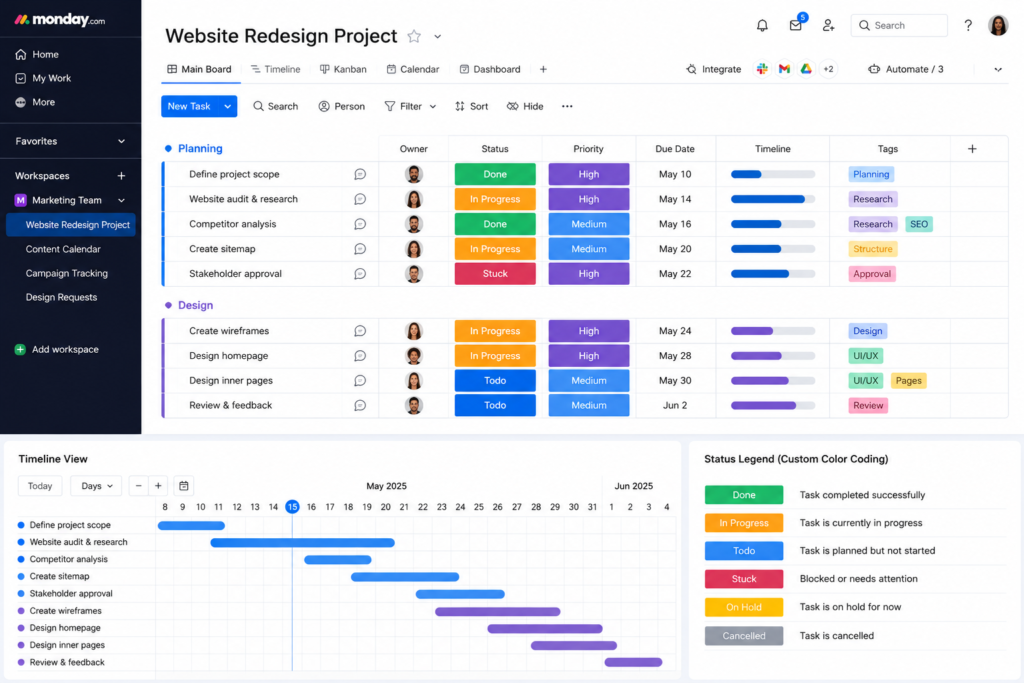
monday.com remains the industry benchmark for visual accessibility. Built around a spreadsheet-like board structure with drag-and-drop customization, it allows non-technical teams to build operational hubs, CRM pipelines, and editorial calendars without engineering support.
Key Strengths
- Rapid Adoption: Color-coded status blocks and intuitive layout make onboarding frictionless for creative and business teams. PricePulse — Competitor Pricing Intelligence for SaaS Founders
- Custom Automation Builder: Constructing multi-step logic (e.g., “When Status changes to Approved, move item to Client Board and notify Design Lead”) takes seconds and runs reliably.
- Flexible Board Views: Toggle seamlessly between Table, Kanban, Timeline, Gantt, and Workload views without data corruption.
The Hidden Pricing Structure
| Tier (Billed Annually) | Advertised Price | Key Features Unlocked | Crucial Omissions |
|---|---|---|---|
| Basic | $9/user/mo | Unlimited boards, 5GB storage, 200+ templates | No Timeline views, integrations, or automations |
| Standard | $12/user/mo | Timeline/Gantt views, 250 automations/mo | Lacks native time tracking & Formula columns |
| Pro | $19/user/mo | Native time tracking, Formula columns, 25,000 automations/mo | Enterprise governance & SSO |
Real-World Example: A 15-person marketing agency running client deliverables will quickly hit the Standard plan’s 250-automation monthly cap within the first week. To operate smoothly, they must upgrade to the Pro Plan ($19/user/month), bringing their true annual software spend to $3,420 rather than the advertised $1,620.
PricePulse — Competitor Pricing Intelligence for SaaS Founders
Where It Breaks (Disqualifiers)
monday.com struggles when managing deep, multi-level task dependencies. If your projects require parent-child task hierarchies three layers deep with hard Finish-to-Start logic across multiple boards, the board interface becomes cluttered and difficult to manage.
AI & Automation Evaluation
- Rating: 4/5
- Utility: Excellent native text generation, auto-categorization of board items, and risk detection summaries.
Verdict: Buy if your team manages marketing campaigns, creative pipelines, or cross-departmental operations requiring high visual clarity. Skip if you require complex agile engineering backlogs or native, deep financial management. Project Management Software | monday.com
2. ClickUp — Best All-in-One Customization for Power Users
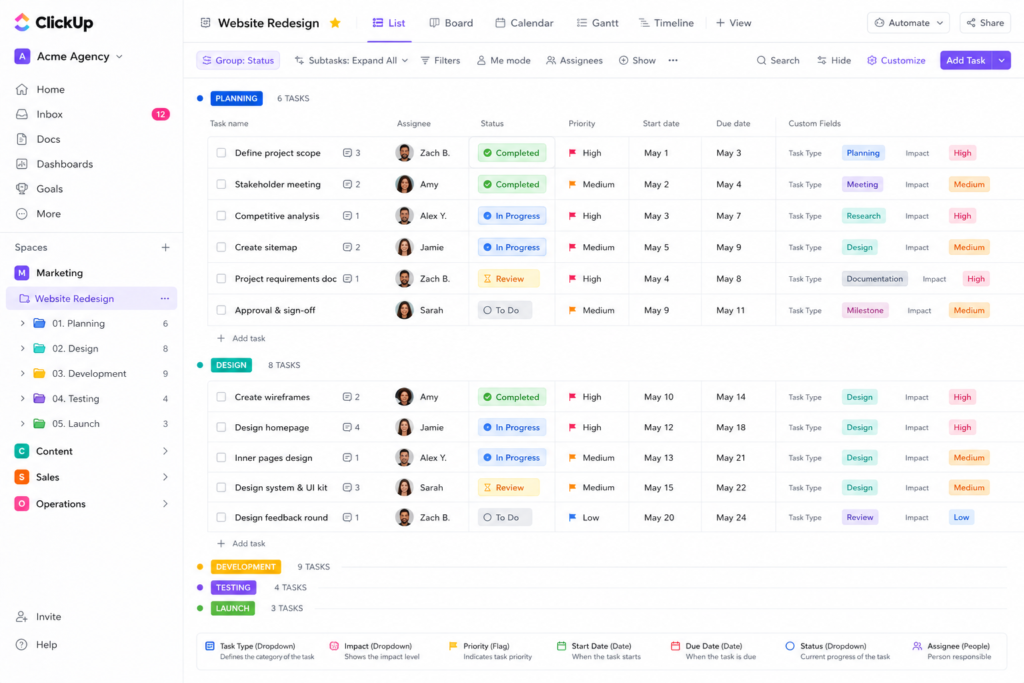
ClickUp positions itself as the single workspace to replace tasks, docs, whiteboards, dashboards, and spreadsheets. For technical teams and system builders, it delivers unparalleled feature depth per dollar spent.
Key Strengths
- Feature Density: Includes native time tracking, document editing, mind mapping, and workload management without forcing higher-tier upgrades. Simplilearn.com
- Extreme Customizability: Highly configurable workspace hierarchy (Workspace > Space > Folder > List > Task > Subtask).
- Value Pricing: Offers more built-in features at its entry tier than any direct competitor on the market.
The Hidden Pricing Structure
| Tier (Billed Annually) | Advertised Price | Key Features Unlocked | Crucial Omissions |
|---|---|---|---|
| Unlimited | $7/user/mo | Unlimited storage, integrations, Gantt views, time tracking | Limits advanced workload views & custom field logic |
| Business | $12/user/mo | Advanced workload management, custom exporting, all automation features | Enterprise SAML/SSO & custom roles |
Where It Breaks (Disqualifiers)
ClickUp’s feature density creates a steep learning curve. Non-technical users often feel overwhelmed by the sheer volume of dropdown menus, toggles, and view configurations. Furthermore, large workspaces containing thousands of nested tasks can experience notable UI lag and slow load times.
AI & Automation Evaluation
- Rating: 3.5/5
- Utility: ClickUp Brain ($7/user/mo add-on) reliably searches connected documentation, summarizes long comment threads, and auto-generates project standup reports. Simplilearn.com
Verdict: Buy if your team has dedicated operations managers who love building dense, customized work environments. Skip if your organization values simple, out-of-the-box software adoption.
ClickUp™ | Maximize productivity • Software, AI, and humans converge
3. Asana — Best for Enterprise Cross-Team Coordination
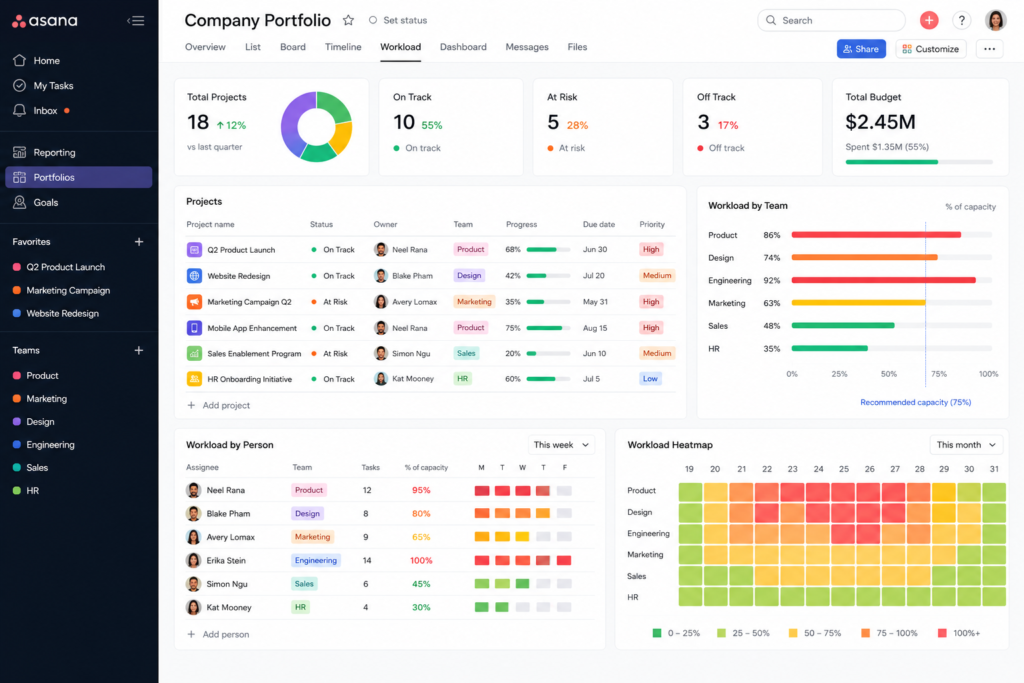
Asana is an enterprise-grade work management platform engineered around clear task ownership, goal alignment, and cross-departmental tracking.
Key Strengths
- Multi-Homing Tasks: Assign a single task to live simultaneously in up to 20 different project boards without duplicating data.
- Portfolios & Goals: Connect individual daily tasks directly to high-level company OKRs and executive portfolio dashboards. PricePulse — Competitor Pricing Intelligence for SaaS Founders
- Enterprise Reliability: Interface remains fast, smooth, and stable even when managing enterprise data sets.
The Hidden Pricing Structure
| Tier (Billed Annually) | Advertised Price | Key Features Unlocked | Crucial Omissions |
|---|---|---|---|
| Starter | $10.99/user/mo | Timeline view, workflow builder, custom fields, 250 automations/mo | Locks Portfolios, Workload tracking, and native time tracking |
| Advanced | $24.99/user/mo | Portfolio management, workload capacity planning, native time tracking | Enterprise admin controls & custom rules |
Real-World Example: A 20-person professional services company needing to balance team workloads across projects must subscribe to the Advanced Tier ($24.99/user/month). This results in an annual spend of $5,997.60—nearly double the cost of ClickUp or monday.com for similar functionality.
Where It Breaks (Disqualifiers)
Asana strictly enforces a “single task assignee” model to maintain clear accountability. If your workflow regularly requires co-owned tasks without dividing them into subtasks, Asana’s core structure can feel rigid and restrictive.
AI & Automation Evaluation
- Rating: 4/5
- Utility: Asana’s AI automatically drafts executive status updates, identifies project risks, and suggests rule-based automation flows. Storyflow
Verdict: Buy if you run a medium-to-large organization that requires clear accountability, cross-team portfolios, and reliable enterprise performance. Skip if you are operating on a tight budget.
PricePulse — Competitor Pricing Intelligence for SaaS Founders Work & Project Management for Human-Agent Teams • Asana
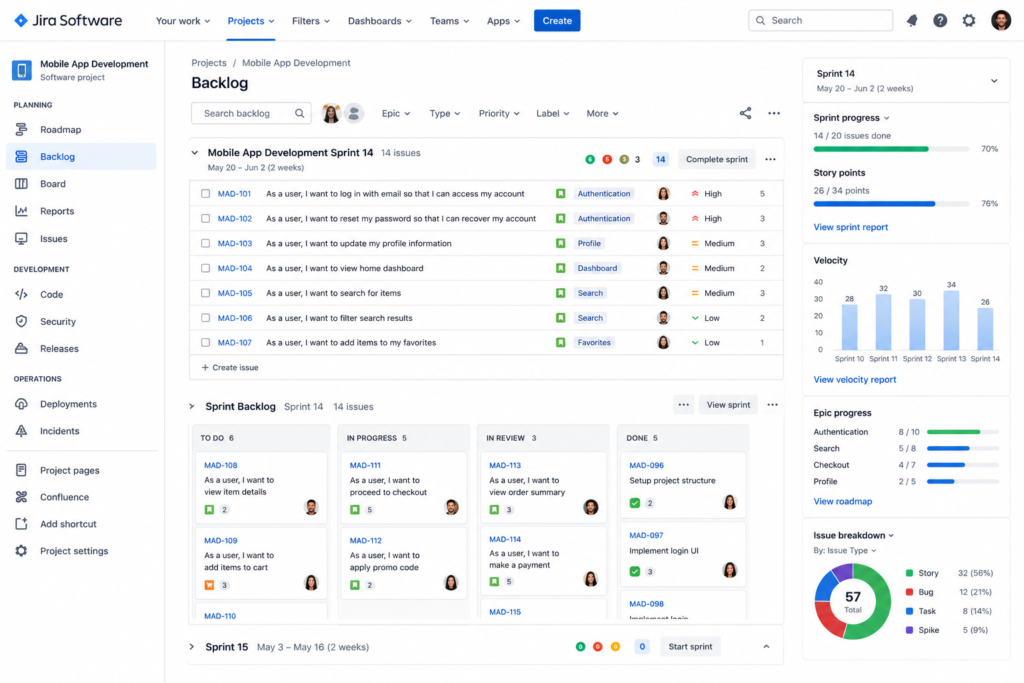
4. Jira — Best for Agile Software Development Teams
Developed by Atlassian, Jira is the industry standard for software engineering, product development, and IT DevOps teams running structured Agile frameworks.
Key Strengths
- Agile Frameworks: Out-of-the-box support for user story mapping, backlog grooming, sprint planning, and burndown charts. Simplilearn.com
- Developer Integrations: Connects directly with GitHub, GitLab, Bitbucket, and CI/CD deployment pipelines.
- Granular Governance: Highly customizable security schemes, issue types, and permission hierarchies suitable for strict IT compliance. PricePulse — Competitor Pricing Intelligence for SaaS Founders
The Hidden Pricing Structure
| Tier (Billed Annually) | Advertised Price | Key Features Unlocked | Crucial Omissions |
|---|---|---|---|
| Standard | $8.15/user/mo | Project roles, granular permissions, 250GB storage | Advanced cross-project roadmaps & capacity management |
| Premium | $16.00/user/mo | Advanced Roadmaps, cross-team capacity planning, 24/7 support | Enterprise-wide multi-site management |
Where It Breaks (Disqualifiers)
Jira is designed specifically for technical teams. Its terminology (e.g., epics, issues, story points, sprint velocity) and complex administrative backend make it difficult to adopt for non-technical departments like marketing, legal, or HR.
AI & Automation Evaluation
- Rating: 3.8/5
- Utility: Atlassian Intelligence assists engineers in drafting ticket specifications, querying issue databases with natural language, and summarizing technical pull request comments.
Verdict: Buy if you manage software engineering or product development teams running two-week sprints. Skip if you need a general-purpose project management tool for business operations.
Jira | Issue & Project Tracking Software | Atlassian
5. Smartsheet — Best for Spreadsheet-Loving Teams & Operations
Smartsheet combines the familiar grid structure of Microsoft Excel with project timelines, document proofing, and automated workflows.
Key Strengths
- Spreadsheet Familiarity: Minimal adoption friction for finance, operations, and construction professionals accustomed to complex Excel models.
- Advanced Formula Calculations: Supports multi-sheet cross-referencing, conditional logic, and complex mathematical formulas.
- Content Proofing: Strong built-in digital asset review and approval workflows.
The Hidden Pricing Structure
| Tier (Billed Annually) | Advertised Price | Key Features Unlocked | Crucial Omissions |
|---|---|---|---|
| Pro | $9/user/mo | Grid, Gantt, Card views; basic automations | Limits total editors; lacks Resource Management add-on |
| Business | $19/user/mo | Unlimited sheet editors, baseline tracking, document proofing | Advanced Resource Management module requires custom enterprise pricing |
Where It Breaks (Disqualifiers)
Smartsheet lacks modern inline team chat and real-time collaboration features. Its mobile application is rigid, and setting up interactive visual dashboards requires significantly more manual effort than modern SaaS alternatives.
AI & Automation Evaluation
- Rating: 3/5
- Utility: Focuses on grid operations—auto-generating sheet formulas, summarizing row data, and building custom text-parsing rules.
Verdict: Buy if your team manages large-scale construction schedules, supply chain logistics, or financial operations. Skip if your team wants a visual workspace centered around creative collaboration and rapid task discussions.
6. Notion — Best for Modular Docs & Knowledge Bases
Notion blends task databases with a block-based text editor, making it an ideal hybrid system for documentation-first organizations and creative teams.
Key Strengths
- Contextual Workspace: Keeps project strategy briefs, wiki documentation, and actionable task items integrated within the same page environment.
- Relational Databases: Allows teams to build custom, interconnected relational databases (e.g., linking Clients to Projects and Tasks). Storyflow
- Low Cost Entry: Offers generous capabilities on free and lower-tier plans.
The Hidden Pricing Structure
| Tier (Billed Annually) | Advertised Price | Key Features Unlocked | Crucial Omissions |
|---|---|---|---|
| Plus | $10/user/mo | Unlimited blocks, file uploads, custom relational databases | Advanced SAML/SSO and teamspace security permissions |
| Business | $15/user/mo | SAML/SSO, private teamspaces, advanced audit logs | Dedicated account manager |
Where It Breaks (Disqualifiers)
Notion is not a true, strict project management system. It lacks native project management safeguards—such as hard Gantt dependency constraints (e.g., automatically shifting child tasks when a parent task slips), workload capacity management, and native time tracking.
AI & Automation Evaluation
- Rating: 4.5/5
- Utility: Notion AI is one of the most mature workspace assistants available. It excels at summarizing long strategy docs, extracting action items, and drafting technical specifications directly within the text editor.
Verdict: Buy if your organization values clear internal documentation, wikis, and highly flexible, custom layout design. Skip if managing strict construction schedules, software sprints, or multi-layered project dependencies.
How much does project management software cost?
Quick Answer: While basic project management plans start between $7 and $11 per user per month, mid-to-large business teams usually pay between $12 and $25 per user per month to unlock essential features like Gantt chart dependencies, automated workflows, guest access, and workload capacity management. The AI workspace that works for you. | Notion
SaaS pricing structures intentionally restrict essential features to higher subscription tiers. To accurately budget for a platform, teams must factor in three variables:
- Tier Gatekeeping: Crucial features like Gantt chart dependencies, workload planning, and custom formulas are frequently locked behind $19–$25/user/month tiers. PricePulse — Competitor Pricing Intelligence for SaaS Founders
- Seat Minimums: Platforms like monday.com enforce minimum seat tiers (e.g., 3, 5, or 10-seat increments), forcing a 4-person team to pay for 5 seats. Simplilearn.com
- Third-Party Add-Ons: Factoring in required integrations for native time tracking, advanced reporting, or AI assistants ($7–$10/user/month extra).
1-Year Total Cost Comparison (10 vs. 25 vs. 50 Users)
The following table calculates the true 1-year software cost for teams requiring timeline dependencies, workflow automations, and workload allocation:
| Software | Required Plan Tier | 10 Users / 1 Year | 25 Users / 1 Year | 50 Users / 1 Year |
|---|---|---|---|---|
| ClickUp | Business Tier ($12/user/mo) | $1,440 | $3,600 | $7,200 |
| monday.com | Pro Tier ($19/user/mo) | $2,280 | $5,700 | $11,400 |
| Smartsheet | Business Tier ($19/user/mo) | $2,280 | $5,700 | $11,400 |
| Jira | Standard Tier ($8.15/user/mo) | $978 | $2,445 | $4,890 |
| Asana | Advanced Tier ($24.99/user/mo) | $2,998.80 | $7,497 | $14,994 |
Key Takeaway: Asana’s Advanced plan costs over 100% more annually than ClickUp Business for similar workload management features. Audit your team’s feature requirements carefully before signing annual SaaS contracts.
Methodology Matching: Aligning Tools with How You Work
Selecting software that runs counter to your team’s operational framework leads to poor adoption and lost productivity. Use this classification matrix to match your workflow requirements:
                                SELECT YOUR METHODOLOGY
                                           │
         ┌─────────────────────────────────┼─────────────────────────────────┐
         ▼                                 ▼                                 ▼
    [ AGILE / SCRUM ]             [ WATERFALL / LINEAR ]            [ HYBRID / KANBAN ]
   Iterative sprint cycles       Strict sequential phases          Flexible visual pipelines
         │                                 │                                 │
         ▼                                 ▼                                 ▼
   Recommended Tools:              Recommended Tools:                Recommended Tools:
   • Jira                          • Smartsheet                      • monday.com
   • ClickUp                       • Wrike                           • Asana
1. Agile & Scrum Frameworks
- Best Options: Jira, ClickUp
- Core Requirements: Backlogs, two-week sprint cycles, burndown charts, story point estimation, velocity metrics.
- Avoid: Smartsheet, Notion (lacks native sprint velocity tracking).
2. Waterfall & Linear Dependencies
- Best Options: Smartsheet, Wrike Storyflow
- Core Requirements: Finish-to-Start task dependencies, Critical Path Method (CPM) calculation, baseline schedules, resource allocation.
- Avoid: Trello, Notion (lacks automatic timeline shifting). Storyflow
3. Hybrid & Kanban Visual Tracking
- Best Options: monday.com, Asana TrackingTime
- Core Requirements: Drag-and-drop status boards, explicit work-in-progress (WIP) limits, visual lane customization, immediate status updates.
- Avoid: Jira (unnecessary complexity for simple visual pipelines).
Step-by-Step Data Migration Guide: Switch Platforms Without Losing Data
Migrating your team to a new platform without a structured plan risks losing file attachments, comment histories, and task dependencies.
+-----------------------------------------------------------------------------------+
|                            3-STEP MIGRATION FRAMEWORK                             |
+-----------------------------------------------------------------------------------+
|  STEP 1: AUDIT & CLEANUP                                                          |
|  • Archive completed legacy projects offline                                       |
|  • Standardize custom field names (e.g., align "Owner" vs. "Assignee")             |
|  • Delete duplicate tasks prior to export                                         |
+-----------------------------------------------------------------------------------+
                                         │
                                         ▼
+-----------------------------------------------------------------------------------+
|  STEP 2: MAP & PILOT (TEST STAGE)                                                 |
|  • Export legacy data to CSV and map headers to target fields                     |
|  • Run a 14-day test pilot with ONE isolated department (e.g., Marketing)         |
|  • Audit missing attachments, broken dependencies, and automation triggers        |
+-----------------------------------------------------------------------------------+
                                         │
                                         ▼
+-----------------------------------------------------------------------------------+
|  STEP 3: CUTOVER & ONBOARDING                                                     |
|  • Set legacy platform to "Read-Only" mode to freeze updates                      |
|  • Execute final database import                                                  |
|  • Conduct role-specific team onboarding sessions focused on daily standup views
Common Data Loss Pitfalls
- Orphaned File Attachments: Direct CSV exports often fail to download cloud-hosted file attachments. Ensure your source tool’s migration assistant or native exporter fully packages embedded media.
- Flattened Sub-Task Layers: Standard imports frequently convert subtasks into standalone primary tasks. Verify sub-task nested structures during your Step 2 pilot run.
- Lost Discussion Context: Task comment histories are rarely transferred via basic CSV files. If historical conversations are required for compliance, retain a read-only license for your legacy software or use custom API scripts.
Frequently Asked Questions (FAQs)
What is the best free project management software for small teams?
ClickUp offers one of the most generous free plans, providing unlimited team members and basic tasks. Asana’s free tier supports up to 15 users with list and board views, while Trello provides free visual Kanban boards for personal or lightweight team use.
PricePulse — Competitor Pricing Intelligence for SaaS Founders+ 1
Which project management tool is easiest to learn?
Trello and Basecamp feature the lowest learning curves, allowing non-technical teams to get up and running in less than an hour. Among full-featured work management platforms, monday.com offers the easiest visual setup and adoption experience.
What is the difference between project management and task management software?
Task management software (e.g., Todoist, Google Tasks) tracks individual, single-step to-do items. Project management software manages complex, multi-layered workflows—tracking dependencies, resource allocation, project budgets, timelines, and multi-team portfolio reporting.
How do I know when my team needs dedicated project management software?
Key operational signals include:
- Project details and decisions getting lost across email threads and chat apps.
- Missed deadlines due to unclear task ownership.
- Inability to monitor individual team capacity and workload balance.
- Relying on manually updated Excel spreadsheets for live project tracking.
Can project management software replace communication tools like Slack or Teams?
No. While modern platforms support context-specific task discussions and inline comments, they do not replace dedicated chat applications for company-wide announcements, quick direct messaging, or instant voice/video calls. They are designed to complement chat tools, not eliminate them.
Read about What is the best AI tool for students in 2026? – nowstrends.com
Google Gemini vs ChatGPT (2026): Which AI Assistant Is Actually Better? – nowstrends.com
Hostinger vs AWS (2026): Which Hosting Is ACTUALLY Better for Beginners? – nowstrends.com
Cloud Computing in AI 2026: 7 Trends to Watch online – nowstrends.com
[…] The result is a technology that is becoming part of routine operations rather than a standalone innovation project. The Best Project Management Software: 2026 – nowstrends.com […]
[…] Read about The Best Project Management Software: 2026 – nowstrends.com […]
[…] The Best Project Management Software: 2026 – nowstrends.com […]
[…] With over 10,000 artificial intelligence applications on the market, […]