

How to Earn Money Using AI in 2026 Everyone seems to have an extreme opinion about AI right now. Half the internet claims it’s a push-button path to early retirement; the other half thinks it’s about to make human work completely irrelevant.
In reality, both sides are missing the point. AI doesn’t replace human effort—it just compresses time. Tasks that used to take three hours of grinding now take fifteen minutes of tweaking. You still need a strategy and good judgment, but you can get to the finished line twice as fast.
To build a sustainable online income, you must pair AI speed with human editorial oversight, brand positioning, and domain expertise. Below is an operational breakdown of seven realistic methods to earn money using AI, complete with required skill levels, software costs, real-world examples, and time-to-income expectations.
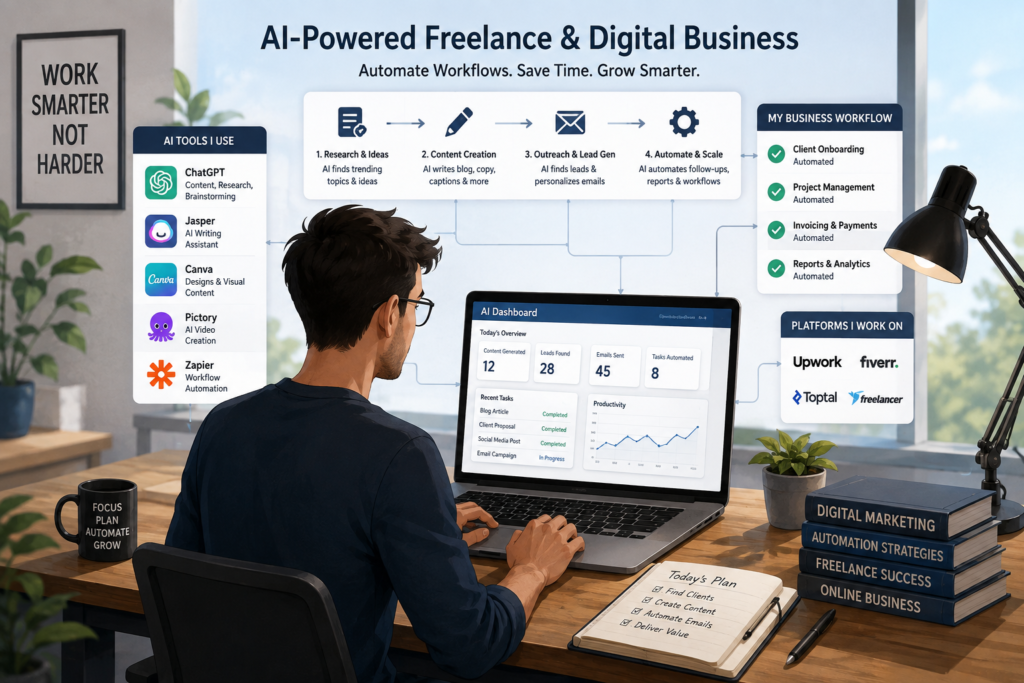
Realistic AI Income Comparison
AdSense & Search Policies: Google explicitly allows AI-assisted content provided it is valuable, accurate, and backed by human expertise. Mass-produced, unedited AI content will lead to search index drop-offs and AdSense policy rejections.
| Income Stream | Upfront Cost | Tech Skill Level | Time to First $100 | Realistic Monthly Potential |
| 1. AI Freelance Writing & Editing | $0 – $20/mo | Low – Medium | 1–2 Weeks | $500 – $3,500 |
| 2. Custom Local Chatbot Setup | $0 – $50/mo | Medium | 2–4 Weeks | $1,000 – $5,000+ |
| 3. Faceless Video Production | $20 – $80/mo | Medium | 1–3 Months | $300 – $4,000 |
| 4. B2B Workflow Automation | $50 – $150/mo | High | 2–4 Weeks | $2,000 – $10,000+ |
| 5. Print-on-Demand & Digital Assets | $30 – $100/mo | Low – Medium | 2–6 Weeks | $200 – $2,000 |
| 6. Micro-SaaS & Custom GPTs | $20 – $100/mo | Medium – High | 1–2 Months | $200 – $2,500 |
| 7. AI Niche Sites & Affiliate Marketing | $50 – $150/yr | Low – Medium | 3–6 Months | $500 – $5,000+ |
Method 1: AI-Assisted Freelance Writing & Editing
Publishing raw AI text directly to clients is a fast track to getting fired. Clients can easily spot generic AI phrasing, lack of depth, and factual hallucinations. However, positioning yourself as a Human-in-the-Loop Content Specialist allows you to double your production volume while keeping quality high.
[Client Strategy / Brief]
          │
          ▼
[AI-Generated Research & Outline]
          │
          ▼
[Human Fact-Checking, SME Input & Tone Tuning]
          │
          ▼
[Polished, Published Asset]
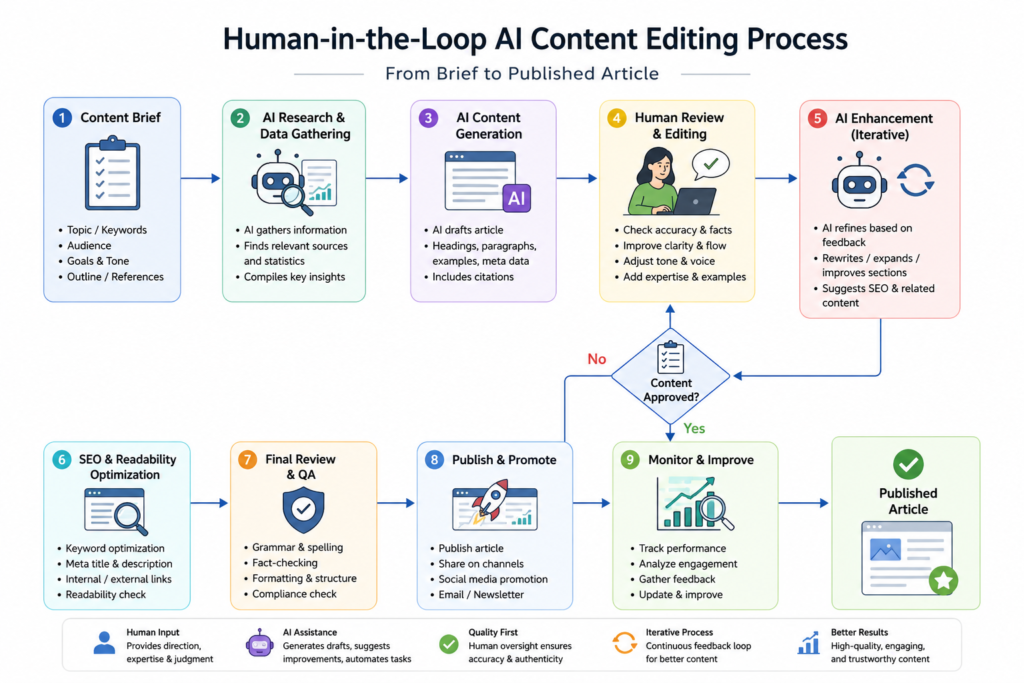
The “Human-in-the-Loop” Editing Workflow
Your core selling point isn’t speed—it’s safety, accuracy, and brand alignment.
- Information Extraction: Feed client briefs, competitor URLs, and raw interview transcripts into an LLM to build a focused outline.
- Draft Generation: Generate section by section rather than requesting a full 2,000-word article at once. This avoids repetitive phrasing and surface-level fluff.
- Fact & Style Audit: Verify every claim, link, and statistic. Strip out telltale AI words (e.g., delve, testament, beacon, spearhead), inject personal experience or quotes, and match the client’s internal style guide.
Practical Example: An agency pays you $150 to write a technical blog post on “Logistics Management Software.” Instead of spending 6 hours researching and writing from scratch, you spend 30 minutes generating structured sections with Claude, 1 hour adding original industry stats and interviewing a logistics manager, and 30 minutes editing. Total time: 2 hours.
Recommended Tool Stack
- LLMs: ChatGPT, Claude, Gemini (Drafting, research, and ideation).
- Editing & Style: Grammarly, Hemingway Editor (Clarity, readability, and grammar checks).
- SEO Optimization: SurferSEO or Clearscope (Ensuring search intent and keyword coverage are met).
Method 2: Building & Monetizing Custom AI Chatbots for Local Businesses
Local service providers—dentists, real estate brokers, HVAC contractors, and roofing companies—lose substantial revenue every month by missing lead inquiries after business hours.
Why Local Businesses Pay for Chatbots
Small business owners rarely have the time or technical knowledge to construct custom lead-capture workflows. By deploying an AI assistant trained on a business’s exact documentation (pricing tiers, service areas, booking links, FAQs), you convert passive website visitors into scheduled appointments.
Step-by-Step Implementation Guide
- Gather Knowledge Base Assets: Request the client’s service menu, standard operating procedures (SOPs), intake forms, and common customer objections.
- Build on No-Code Platforms: Use platforms like Voiceflow, Botpress, or ManyChat. Upload the client’s documents so the AI grounds its answers strictly in verified business data.
- Set Guardrails: Program strict system prompts: “If asked a question outside the provided documents, respond: ‘I want to make sure you get the exact details. Let me transfer you to our lead office coordinator.'”
- Deploy: Insert the generated script snippet into the header of the client’s website (WordPress, Wix, Squarespace).
Retainer Pricing Model
- Upfront Setup Fee: $500 – $1,500 (covers prompt engineering, knowledge base upload, and testing).
- Monthly Maintenance Retainer: $99 – $299/month (covers ongoing API usage costs, monitoring transcript logs, and updating business information).
Method 3: Faceless Social Media & Video Production
Faceless content channels generate ad revenue, affiliate sales, and brand sponsorships on platforms like YouTube, TikTok, and Instagram without requiring you to appear on camera.
The Automated Video Pipeline
- Scripting: Prompt an LLM to generate a 60-second or 10-minute script complete with visual directions, hook variations, and a call to action.
- Voice Generation: Run the script through voice tools like ElevenLabs to generate natural human voiceovers (avoid monotone, default robotic voices).
- Visual Assembly: Source stock footage, AI graphics (Midjourney/DALL-E), and dynamic subtitles using video editors like CapCut, InVideo, or Runway.
Monetization Tip: Avoid generic “motivational quotes” or “compilation” channels, as video platforms frequently demonetize unedited reused content. Focus on high-CPM niches like financial literacy, tech tutorials, history deep dives, or real estate breakdowns.
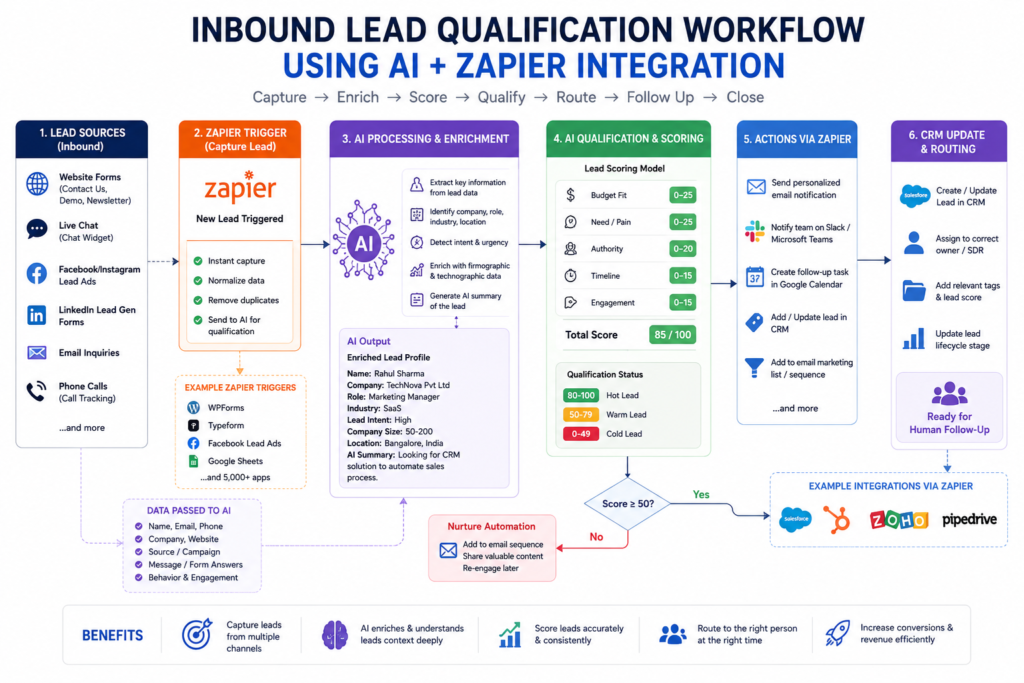
Method 4: B2B Business Automation & Micro-Consulting
Businesses routinely pay high rates to remove repetitive manual tasks from their daily operations. If you can automate a five-hour weekly process for an executive, you deliver immediate, measurable ROI.
+-------------------+     +--------------------+     +-------------------+
| Inbound Inquiry   | --> | Make.com / Zapier   | --> | AI Qualification  |
| (Form or Email)   |     | (Data Interceptor) |     | (Parse & Score)   |
+-------------------+     +--------------------+     +-------------------+
                                                       │
                                                       ▼
                                             +-------------------+
                                             | Auto-Draft Response|
                                             | & Log in CRM      |
                                             +-------------------+
High-Value Automation Scenarios
- Inbound Lead Triage: Automatically parsing incoming contact emails, scoring the lead using AI evaluation prompts, and updating the sales team’s CRM (HubSpot/Airtable).
- Omnichannel Content Repurposing: Creating a workflow where uploading a raw podcast recording automatically outputs a transcript, three LinkedIn posts, a newsletter issue, and a blog outline.
Core Automation Tools
- Integration Engines: Make.com or Zapier.
- Processing: OpenAI API or Anthropic API nodes integrated directly into custom automation steps.
Method 5: Print-on-Demand & Digital Asset Sales
Creating digital assets has virtually zero inventory risk, but long-term earnings depend on choosing unsaturated niches and understanding commercial licensing.
Intellectual Property & Platform Compliance
- Purely AI-generated images generally cannot hold copyright protection in major legal jurisdictions.
- Combine AI elements with custom typography, unique vector edits, or physical product pairings to create a legally defensible asset.
- Always review marketplace terms; platforms like Etsy and Amazon KDP require clear disclosure when AI tools are used during product creation.
In-Demand Asset Categories
- Pattern Packs: Seamless vector graphics sold to designers and craft businesses.
- Productivity Templates: AI-assisted planners and habit trackers formatted in Canva for direct Etsy download.
- Targeted Print-on-Demand: High-resolution graphics produced with Midjourney for specific hobbies (e.g., rare plant enthusiasts, regional hiking clubs) printed on demand via Printify or Gelato.
Method 6: Building Micro-SaaS Tools & Custom GPTs
You do not need a degree in computer science to launch software products. Using visual builders and AI code assistants like Cursor, Replit, or Claude Code, you can launch single-purpose web tools rapidly.
+-----------------------------------------------------------------+
|                       MICRO-SAAS ECOSYSTEM                      |
|                                                                 |
|  +------------------+    +------------------+    +-----------+  |
|  |   Frontend UI    | -> | OpenAI/Claude    | -> | Output    |  |
|  |  (Next.js/HTML)  |    | API Processing   |    | Delivery  |  |
|  +------------------+    +------------------+    +-----------+  |
|                                                                 |
|  Monetization: Stripe / Paddle Subscription ($9 - $29/month)   |
+-----------------------------------------------------------------+
Execution Paths
- Custom GPTs: Package specialized system prompts and proprietary files inside OpenAI’s GPT builder. Earn revenue through engagement payouts or use the free GPT as a top-of-funnel lead magnet for a paid newsletter.
- Niche Web Utilities: Create lightweight web interfaces that solve specific operational problems—such as a real estate property description generator, an alt-text creator for e-commerce, or a cold email customizer. Charge $9–$29/month via Stripe integration.
Method 7: AI-Powered Niche Sites & Affiliate Marketing
Building content-driven websites remains a viable business model when executed in full compliance with search engine guidelines and user-first principles.
Search Policy Alignment
Google’s guidelines focus on content quality rather than how the content was produced. To build search authority and maintain AdSense monetization approval:
- Demonstrate Real Experience (E-E-A-T): Include original photos, personal testing logs, hands-on reviews, and verifiable author details.
- Avoid Scaled Thin Content: Do not auto-publish dozens of generic, unedited AI articles daily. Quality beats sheer volume every time.
- Diversify Revenue: Pair Google AdSense display units with high-converting affiliate links (Amazon Associates, Impact, ShareASale) and digital products.
Operational Expenses: Software Budgeting Breakdown
While many platforms offer free trials, running a commercial setup requires budgeting for underlying AI software subscriptions.
| Tier | Monthly Budget | Essential Tool Stack | Target Business Model |
| Bootstrapper | $0 – $20 | ChatGPT Free / Claude Free, Canva Free, CapCut Free | Freelance editing, simple copywriting, image generation |
| Professional | $50 – $100 | ChatGPT Plus ($20), ElevenLabs ($11), Midjourney ($10), Make.com ($9) | Faceless video production, content editing, basic automation |
| Agency / Business | $200 – $500+ | OpenAI API ($50+ pay-as-you-go), Botpress Pro, Zapier, Webflow/Shopify | Chatbot agency setup, B2B enterprise automation, Micro-SaaS |
Common Pitfalls: Why 80% of Beginners Fail
- Publishing Raw AI Output: Unedited AI text lacks original insight, contains factual hallucinations, and performs poorly in search engines over time.
- Targeting Saturated, Generic Markets: Trying to sell standard “AI Art Kits” on Etsy without a clear, specific target audience yields negligible results.
- Ignoring Platform Policy Updates: Failing to track copyright guidelines, AdSense policies, or platform disclosure rules can result in account bans.
- Underestimating Customer Acquisition: Having access to AI tools is only half the battle; learning sales, lead generation, and client retention is what makes a business profitable.
Frequently Asked Questions (FAQs)
Can you earn passive income using AI?
AI automates significant operational work, but true hands-off passive income is rare. Upfront effort is always required to set up systems, audit output quality, handle customer acquisition, and maintain technical integrations.
Is it legal to sell AI-generated content and art?
Yes, provided your assets do not infringe on registered trademarks, copyrights, or publicity rights, and that you comply with the terms of service of both the AI tool and the selling platform.
Do I need programming skills to make money with AI?
No. The vast majority of accessible AI income streams—such as custom chatbot deployment, workflow automation, and content creation—use visual, no-code interfaces.
How much money can a beginner realistically earn in their first 30 days?
A beginner offering service-based solutions (like AI content editing or chatbot setup) can realistically land 1–2 initial clients and earn $100 to $500 in month one. Scaled asset models (niche sites, software, video channels) usually require 3 to 6 months of consistency before generating meaningful returns.
Will Google penalize websites that publish AI-generated content?
Google does not penalize content simply for using AI. Penalties target low-quality, repetitive, or unhelpful content designed purely to manipulate search rankings. As long as your content is accurate, well-structured, and provides real value to users, AI-assisted writing is fully compliant.
Read about The Best Project Management Software: 2026 – nowstrends.com
Cloud Computing in AI 2026: 7 Trends to Watch online – nowstrends.com
What is the best AI tool for students in 2026? – nowstrends.com
Google Gemini vs ChatGPT (2026): Which AI Assistant Is Actually Better? – nowstrends.com
Supabase vs MongoDB Atlas: Best Cloud Database 2026 – nowstrends.com
AI Trends in 2026: 10 Breakthrough Technologies Changing the Future – nowstrends.com
[…] Read about How to Earn Money Using AI in 2026 – nowstrends.com […]